



HSN Code & Document Summary Now Mandatory
If you are a GST-registered business or an accountant managing GST filing of your clients, there is an important update you should know before filing your next GSTR-1.
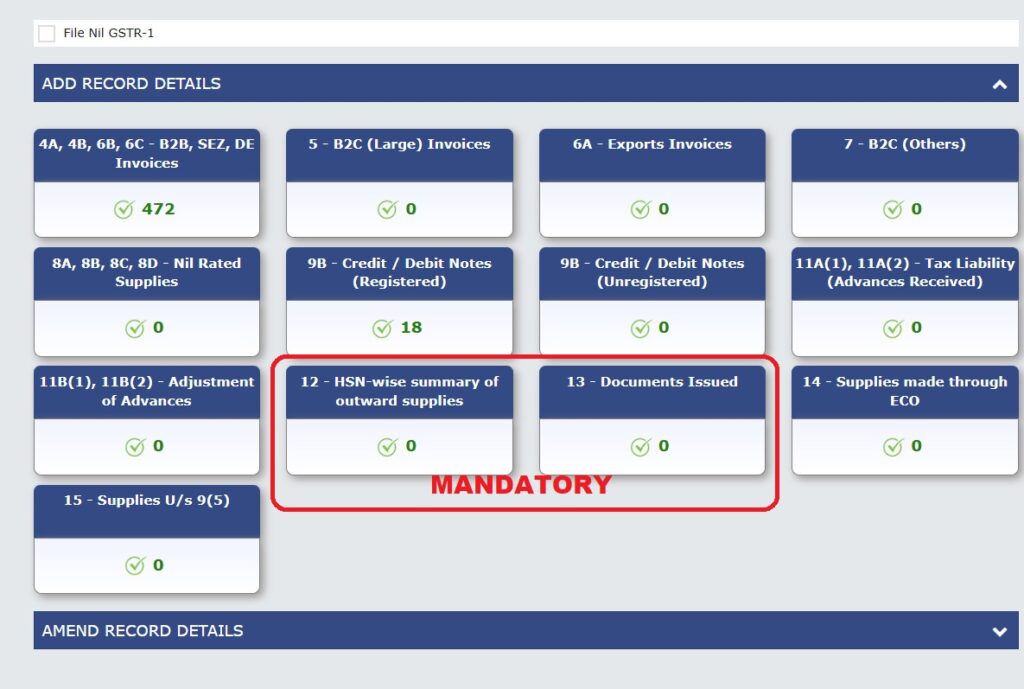
Starting from June 2025, the GST Portal has made it compulsory to report HSN codes and document summary correctly in your GSTR 1. Without it, you won’t be able to file your GSTR-1.
Here are the details of changes in GSTR -1
What is Changed in GSTR-1?
1. Table 12 & 13 Are Now Mandatory
Earlier, Tables 12 and 13 (Table 12 HSN summary and Table 13 Document Summary) were often skipped. These tables can’t be skipped anymore! From June 2025, if these are left blank then you won’t be allowed to file GSTR-1. A warning will pop up and block submission.
2. Separate Sections in table 12 for B2B & B2C
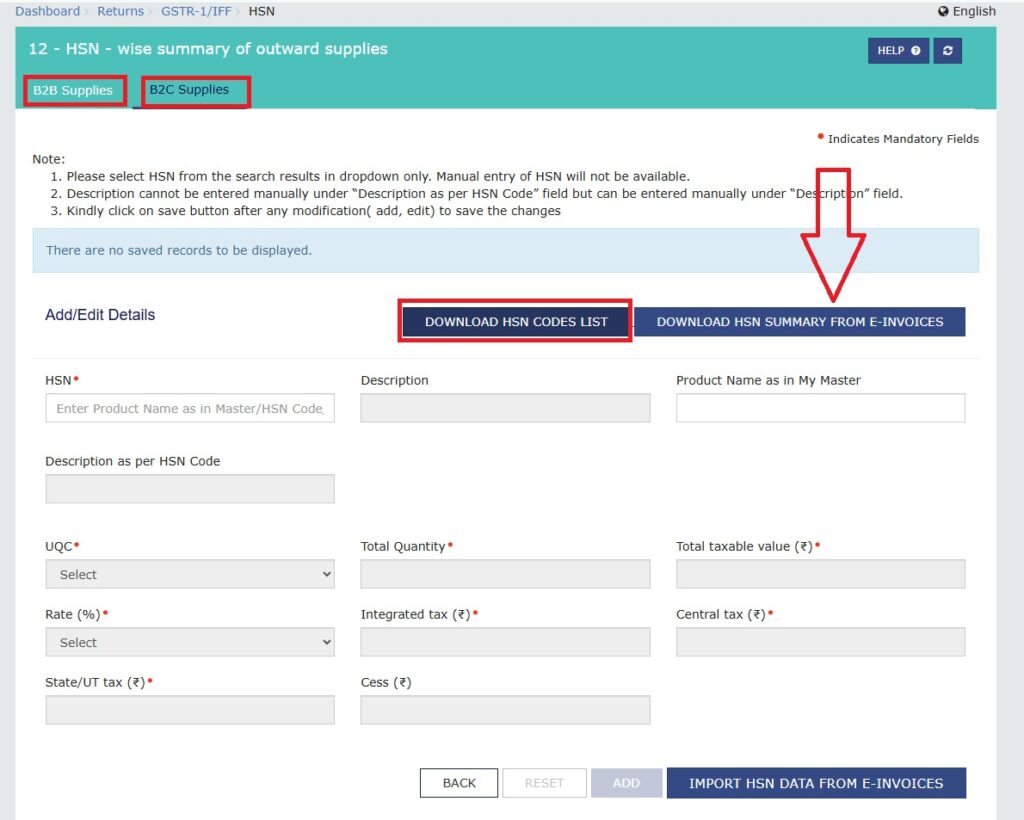
Now Table 12 is divided into two parts:
- B2B Supplies
- B2C Supplies
Now you need to enter HSN/SAC codes separately for B2B and B2C category.
3. HSN Code Mandatory for All B2B Invoices
From june onwards, every B2B invoice must have at least a 4-digit HSN code/SAC, even if your annual turnover is less than Rs. 5 crore.
No relaxation is provided now .HSN for B2B is compulsory for everyone..!
4. HSN for B2C is Based on Turnover
- If your annual turnover is more than Rs. 5 crore, HSN reporting for B2C invoices is also mandatory for you.
- If your turnover is up to Rs.5 crore, HSN for B2C remains OPTIONAL for you but it’s good to start updating your system now.
5. No Manual Typing, Only Dropdown HSN Selection
You can no longer type HSN codes manually on the portal.
The system now allows ONLY DROPDOWN SELECTION, which helps avoid typos and invalid entries.
6. Download HSN Code List Easily
Not sure about what is your HSN codes?
You can now download the full list in Excel format directly from the portal or download HSN summary from your e–invoice portal.
Super handy for reference!
7. Create HSN Master for Easy Filing
The GST portal now allows you to save frequently used HSN codes in your account by creating “HSN Master”.
Use the “HSN Master” feature to save time in future filings. You don’t need to enter the same codes again and again.
8. Auto Checks and Warnings are in Place
Don’t worry about missing something, the system will now:
- Auto-check your entries
- Show warnings if anything is missing or incorrect
- You won’t be allowed to file unless all required HSN fields are filled properly.
Why These Changes Matter
These changes are aimed at:
- Improving data accuracy
- Reducing mismatches between GSTR-1 & 3B
- Making your filings more GST-compliant
What You Should Do Now
- Ensure you know the correct HSN codes for your products or services
- Update your accounting software to match this requirement
- Create your HSN master on the portal
- Talk to your GST consultant if need assistance
Do you need help with GSTR-1 filing or HSN code classification?
Reach out Taxtrix for simplified GST compliances. We simplify GST compliances for MSMEs, freelancers, startups, D2C brands, and small businesses like yours.
We’ll make sure your returns are filed on time and error-free. Visit: www.taxtrix.in Or WhatsApp us now at 9810324605 to get started with smooth GST filing..!!


Related Articles

GSTR 1 ADVISORY: Introduction of New Table 14 and 15
Big News!! for Business In January 2024, The CBIC Department is rolling...


How to eWay Bill Generation, Limits, Rules, Bulk eWay Bills
In this article i will going to tell you the way of...

Leave a comment